%20(1)-B86R08ZzwhPzS6UZbG3mSxRWPCwGwn.png)



Most advice about web page architecture starts with a number: keep every important page within three clicks of the homepage. I've watched that rule produce the opposite of what teams wanted. Large sites flattened their information architecture into overlapping hubs, published thin summaries, and made it harder to understand which page served which intent.
A strong architecture isn't flat for its own sake. It's a system that helps search engines discover valuable URLs, helps users understand where they are, and gives each topic the depth its audience requires. The right model is usually intelligent hybrid depth: shallow access for high-value pages, deeper paths for archives and specialized resources, and internal links that make the relationship between them obvious.
Inhaltsverzeichnis
- Why Flat Architecture Is the Wrong Goal
- Build Semantic Heading and Landmark Structure
- Design URL Structure and Topic Silos
- Apply the Internal Linking Rule That Works
- Keep Critical Content Out of Render Queue
- Audit Crawl Budget and Secure Delivery Gaps
- Structure for AI Overviews Not Just Blue Links
- What I Learned Rebuilding a 20k Page Site
Why Flat Architecture Is the Wrong Goal
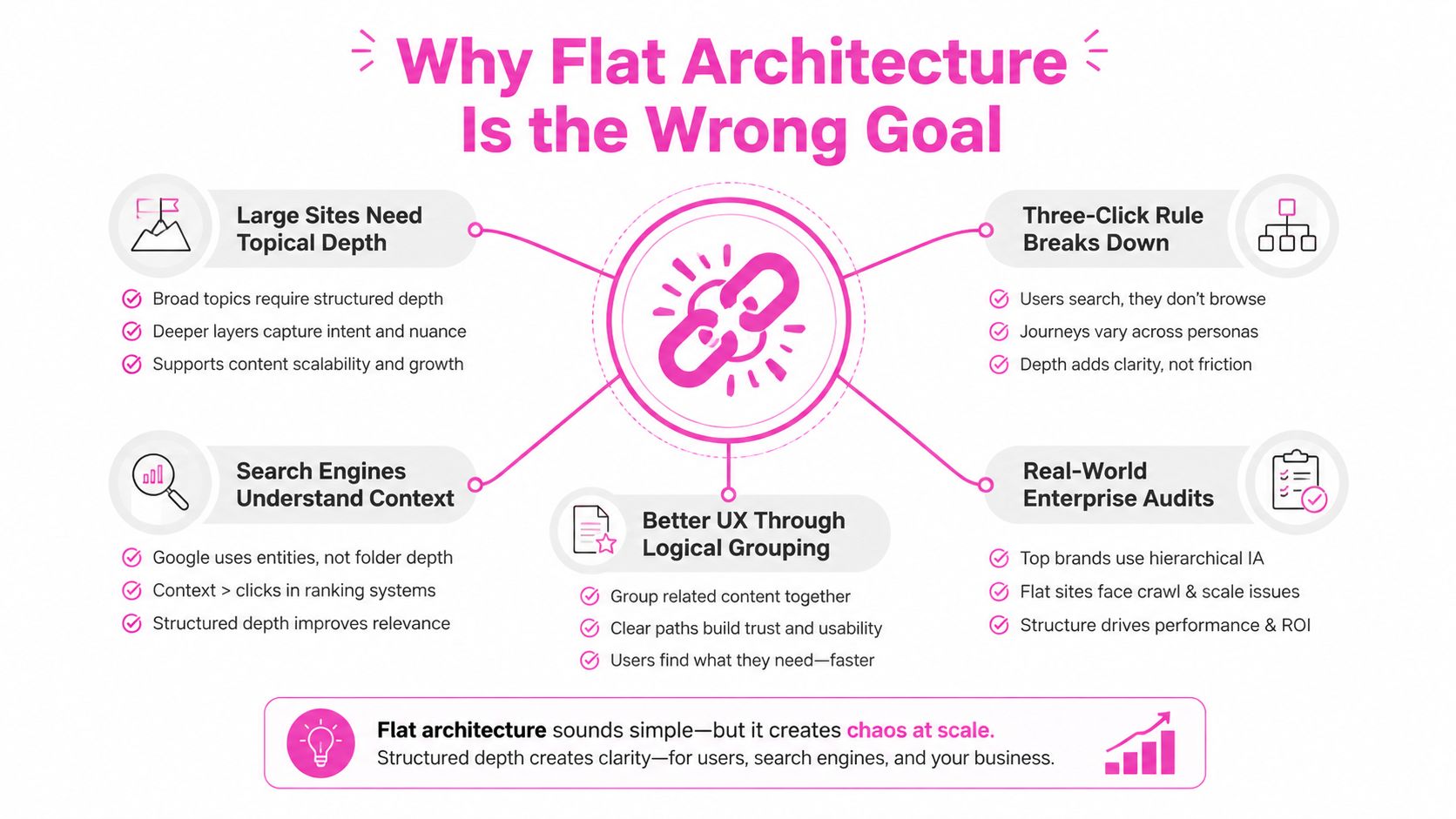
The three-click rule is useful as a diagnostic, but it's a poor universal law. When I audit enterprise sites, I don't ask whether every URL is equally close to the homepage. I ask whether the pages that deserve demand, links, conversions, or frequent updates are easy to reach from relevant hubs.
Forcing every page into a shallow structure often creates weak category pages. Several hubs end up targeting the same broad phrase, while detailed content gets stripped of the context that made it useful. The result is a flatter site that's harder to crawl intelligently and harder for users to traverse.
Use depth according to page value
Current SEO guidance increasingly favors a hybrid, or “intelligent flat,” model. Revenue-critical pages stay within three clicks, while archives and specialized content can sit deeper when the hierarchy gives those pages clear topical context. The distinction is discussed in SEO guidance on intelligent flat architecture, and it matches how I prioritize real sites.
I usually place these pages close to top-level hubs:
- Commercial landing pages: Product, service, category, and comparison pages tied directly to business intent.
- Strategic editorial hubs: Pages that consolidate a meaningful topic and link to its most important subtopics.
- Fresh or frequently updated resources: Content where discovery speed affects business value.
- High-authority destinations: URLs that attract external links and should distribute relevance through the site.
Archives, historical resources, granular documentation, and niche entity pages can live deeper if they have descriptive breadcrumbs, strong parent links, and relevant paths back to the hub. A deeper URL isn't automatically weak. An unexplained URL is.
Praktische Regel: Keep important pages shallow by business value, not by an arbitrary distance from the homepage.
The architecture model described by Kogifi on site hierarchy is useful when teams need to balance accessibility with meaningful grouping. I also test whether a page earns its place in a hub by examining its intent, unique information, internal links, and conversion role. If it adds no distinct value, I merge it. If it answers a specialized need, I let it retain depth and strengthen its connections.
Build Semantic Heading and Landmark Structure
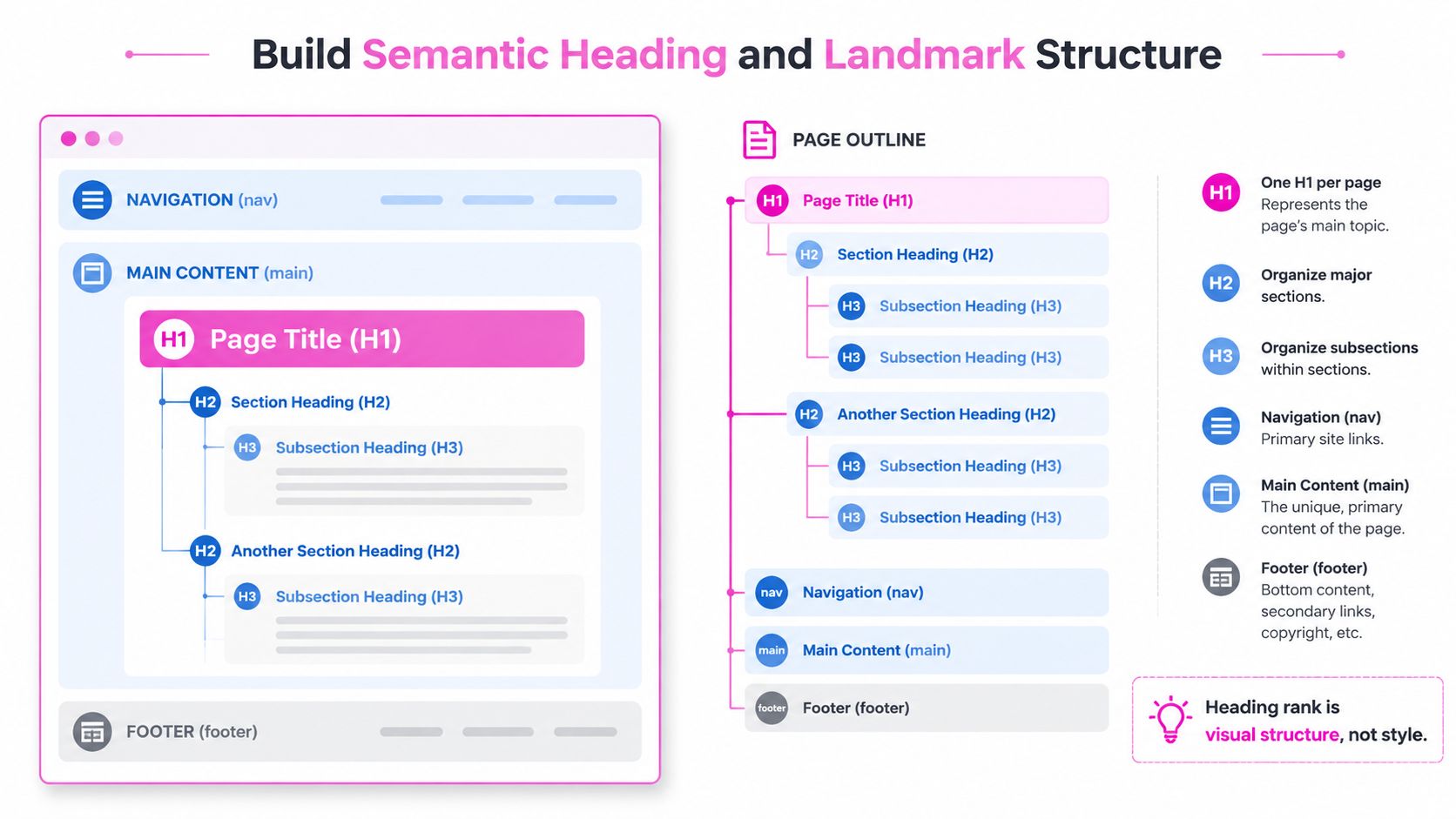
I treat the page template as an agreement between the content team, the browser, assistive technology, and search systems. Visual styling can make a heading look prominent, but appearance doesn't define its structural rank. The document outline does.
The implementation starts with one clear page heading, followed by sections that reflect the content's actual hierarchy. The W3C guidance on heading structure states that heading hierarchy should be semantic rather than visual. A rank 1 heading is the most important heading, equal or higher ranks begin new sections, and lower ranks create subsections.
The template skeleton I use
I don't jump from an h2 to an h4 because a designer wants a smaller visual treatment. I change the CSS, not the semantic rank. A product page might follow this outline:
- H1: Product name and primary purpose
- H2: Benefits or use cases
- H2: Specifications
- H3: Dimensions
- H3: Materials
- H2: Delivery and support
- H2: Häufig gestellte Fragen
That structure gives editors a repeatable pattern and gives screen readers a logical route through the page. For product teams working through content and conversion details, these product detail page best practices provide useful complementary guidance.
Landmarks give the outline a second layer. I use a header for site-level identity and controls, nav for primary navigation, one main element for the unique page content, aside for complementary material, and footer for closing site information. The accessible architecture guidance from AudioEye's landmark coding resource emphasizes these regions and the requirement for only one main element.
What I check during implementation
I inspect rendered markup, not just the CMS editor. Common failures include a page title rendered as styled text, repeated h1 elements from reusable components, navigation inserted inside main content, and sidebar widgets marked up as if they were primary sections.
I also test keyboard navigation and a screen reader outline. If a user can't bypass repeated navigation or identify the main content quickly, the template has a structural problem, even if the page looks polished.
Design URL Structure and Topic Silos
URL folders don't create topical authority by themselves. I use them to express relationships that already exist in the content model, not to simulate relevance with decorative nesting.
On a large catalog build, I mapped 4,000 pages into product, application, industry, and support groups. The useful part wasn't the folder naming. It was deciding which pages answered distinct intents and which pages merely repeated the same commercial language. Short, static, descriptive URLs made those decisions visible, while long parameter strings concealed them.
Build around entities and intent
A practical cluster might look like this:
/software/as a broad category hub/software/project-management/as an intent-specific hub/software/project-management/features/for feature-level information/software/project-management/integrations/for connected tools/software/project-management/use-cases/remote-teams/for a specialized use case
I don't force every child into a URL path that mirrors every parent relationship. A page can sit in a deeper topical cluster while remaining technically reachable through a concise URL. The folder should help users and systems understand the subject, but it shouldn't become a substitute for internal linking.
Die keyword research and topic clusters guidance is useful for separating query groups before creating pages. I begin with intent, entity relationships, and content ownership. Then I decide whether the site needs a separate page, a subsection, or no new URL at all.
Where siloing fails
My first silo maps were too rigid. A resource could belong to an industry, a feature, and a job-to-be-done, but the architecture allowed only one parent. Editors created duplicate pages to satisfy competing teams, and those pages overlapped enough to confuse both users and search engines.
I now use a primary classification plus cross-links where relationships matter. I merge sections when they target the same intent, share the same conversion path, and can't offer distinct information. I separate them when the audience, task, evidence, or product decision differs.
A shallow URL path can support efficient discovery without flattening the content hierarchy. The important question is whether every URL has a clear role and a deliberate route through the link graph.
Apply the Internal Linking Rule That Works
Internal navigation fails when teams treat the main menu as the entire link strategy. A page can appear in a dropdown and still have no meaningful relationship to the surrounding content. Search engines and users need contextual links that explain why one page leads to another.
My operating rule is straightforward: every important page should receive at least five internal links from relevant pages, and any important page at crawl depth 4 or more needs attention, according to this internal-linking crawl budget guidance.
The monthly workflow
I start with a crawl export and a sitemap comparison. The crawl tells me what the site exposes through links. The sitemap tells me what the organization believes deserves discovery. The differences usually reveal one of four problems:
- Orphan pages: URLs listed in the sitemap but not reached through internal links.
- Navigation-only pages: URLs linked from a global menu but absent from relevant body copy.
- Deep important pages: Commercial or strategic pages buried behind several intermediate steps.
- Broken paths: Redirect chains, especially chains with two or more hops, that weaken the route and complicate maintenance.
I then sort pages by business importance and inspect inbound link sources. A page with five links from unrelated footer modules hasn't met the spirit of the rule. I want links from pages that share a topic, answer a preceding question, or move a user toward a sensible next step.
A link should explain a relationship, not merely prove that two URLs exist.
Fix the graph, not just the page
For an orphaned service page, I might add links from the relevant service hub, adjacent use-case articles, a comparison page, and a support resource. For an archive page, I may strengthen the parent hub and add date or topic navigation rather than forcing the archive into the main menu.
I also check anchor text for accuracy. Repeating one commercial phrase everywhere looks mechanical and gives users little context. Descriptive variation works better because it reflects the actual relationship between the source and destination pages.
The final step is a recrawl. I don't mark the ticket complete because a developer added a link in a template. I confirm that the rendered page exposes the link, the destination returns the intended response, and the route appears in the resulting crawl graph.
Keep Critical Content Out of Render Queue
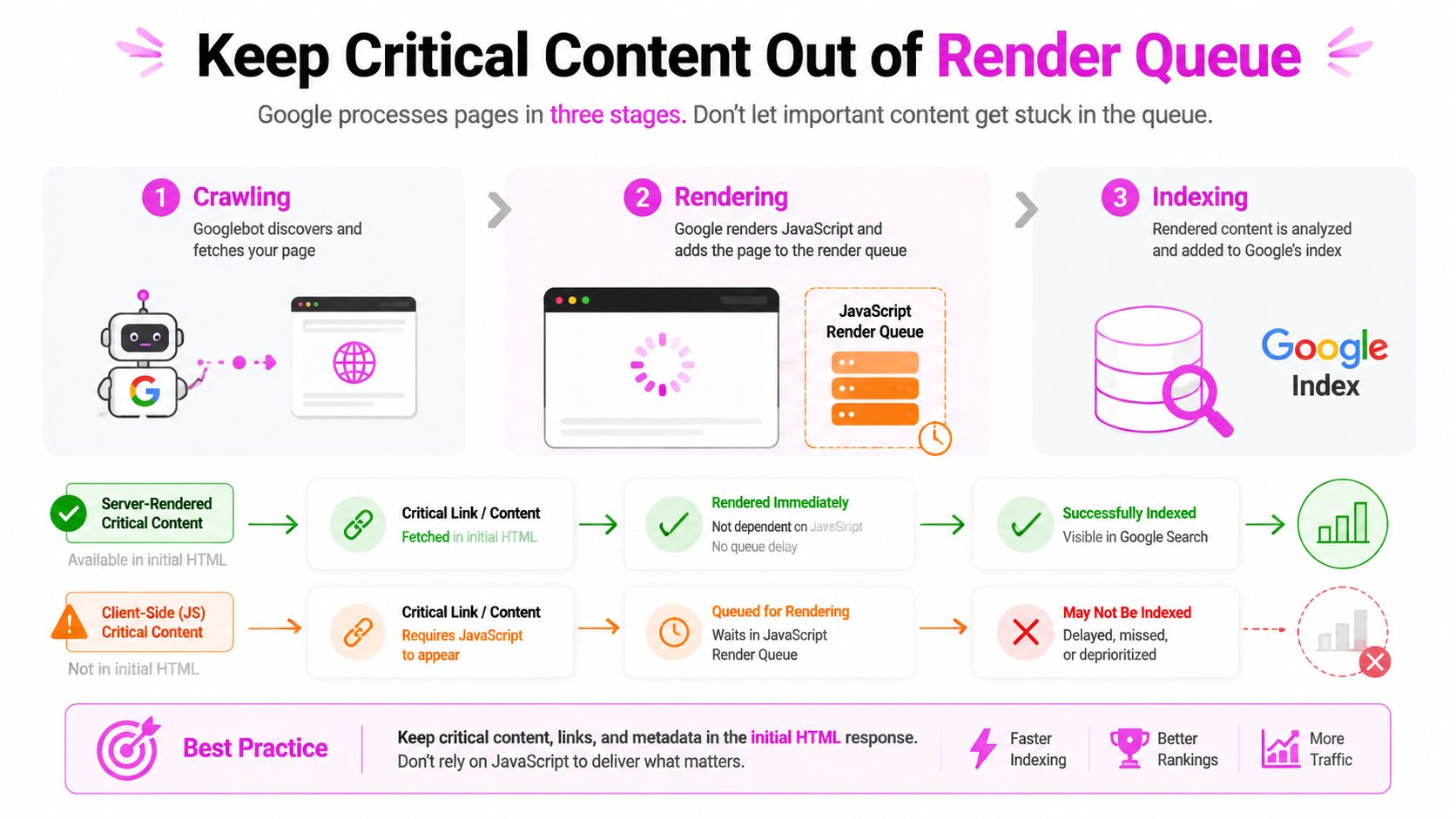
Google processes JavaScript pages through crawling, rendering, and indexing, as documented in its JavaScript SEO basics. That pipeline doesn't mean client-rendered sites are automatically invisible. It means architecture that depends on late execution introduces another processing step between discovery and evaluation.
I learned this during a client-rendered rebuild where the initial HTML contained a shell, while important links and product copy appeared only after JavaScript ran. The page worked perfectly in a browser, but the search-facing source didn't contain the same structure. That made debugging much harder because a successful visual render concealed an incomplete delivery layer.
Put the important signals in server HTML
For pages where discoverability matters, I prefer server-side rendering, static generation, or a hybrid approach. The initial response should contain:
- Primary content: The text that establishes what the page answers.
- Critical internal links: Links to related pages, parent hubs, and important commercial destinations.
- Canonical signals: The preferred URL should be clear without waiting for client-side code.
- Structured data: Machine-readable details should be present in the delivered document when appropriate.
This doesn't prohibit JavaScript. Filters, personalization, interactive comparisons, and progressive enhancements can still run on the client. I separate those conveniences from the content and links that search engines must reliably discover.
Account for timing variance
Eligible pages returning HTTP 200 are generally queued for rendering. One 2024 dataset reported a median delay of about 10 seconds between crawl and completed render, while the slowest 1% waited around 18 hours. Those figures come from independent reporting on JavaScript SEO rendering, and they illustrate why average behavior isn't enough for critical URLs.
The practical response isn't panic. It's risk reduction. If a page contains a time-sensitive offer, a newly published hub, or a link path to important inventory, I don't make its existence depend on a rendering queue.
After deployment, I compare source HTML with rendered HTML, inspect links in both states, and test canonical and structured data output. A page that looks correct in Chrome can still have an architecture defect in its first response.
Audit Crawl Budget and Secure Delivery Gaps
Google defines crawl budget as the URLs it can and wants to crawl, combining crawl capacity with crawl demand in its crawl budget documentation. That definition changes how I audit large sites. I don't try to make every URL equally crawlable. I reduce wasted paths and make important destinations easy to reach.
Pagination and faceted navigation are common sources of waste. A retail site may expose combinations of filters that produce near-duplicate pages, while an editorial archive may generate many parameter variations with little standalone value. I map which combinations deserve indexable URLs, which should remain navigational states, and which should be consolidated.
The audit sheet
I prioritize findings using four questions:
| Audit area | What I inspect | Typical decision |
|---|---|---|
| Page reachability | Can important URLs be reached through relevant hubs? | Add contextual links or improve hub structure |
| Faceted paths | Do filters create useful, distinct destinations? | Keep selected combinations, control the rest |
| Pagination | Does each archive route add discoverable content? | Maintain useful paths and remove needless variants |
| Delivery security | Does the site consistently serve secure versions? | Resolve mixed structural delivery patterns |
HTTP Archive's 2025 SEO report recorded HTTPS usage at 91.7% of desktop pages und 91.5% of mobile pages, compared with about 89% across devices in 2024. The same report showed home pages were less likely to use HTTPS than inner pages, 84.64% versus 92.42% on desktop und 86.64% versus 93.45% on mobile. These figures appear in the crawl budget reference, and they're useful as an audit signal because one site can contain different delivery patterns by page type.
Connect technical controls to intent
I inspect robots directives, canonicals, sitemaps, redirects, and internal links as one system. A noindex directive can be appropriate for a low-value filter state, but linking heavily to that state wastes attention. A canonical can consolidate duplicates, but it shouldn't replace a clear URL model.
For a focused reference on controlling indexation directives, I use this guide to the Meta-Robots-Tag. I then validate the implementation in a crawl and compare it with the pages the business wants users and search engines to find.
Structure for AI Overviews Not Just Blue Links
Classic architecture asks whether a crawler can find a page and whether that page can rank. Generative search adds another question: can a system extract a trustworthy, self-contained answer from the page and connect it to the right entity?
Current coverage describes a shift toward AI-readable, answer-ready pages, while much of the advice still repeats hierarchy, internal linking, and schema without showing which page patterns earn citations. That gap is highlighted in Search Engine Land's discussion of SEO and AI influence.
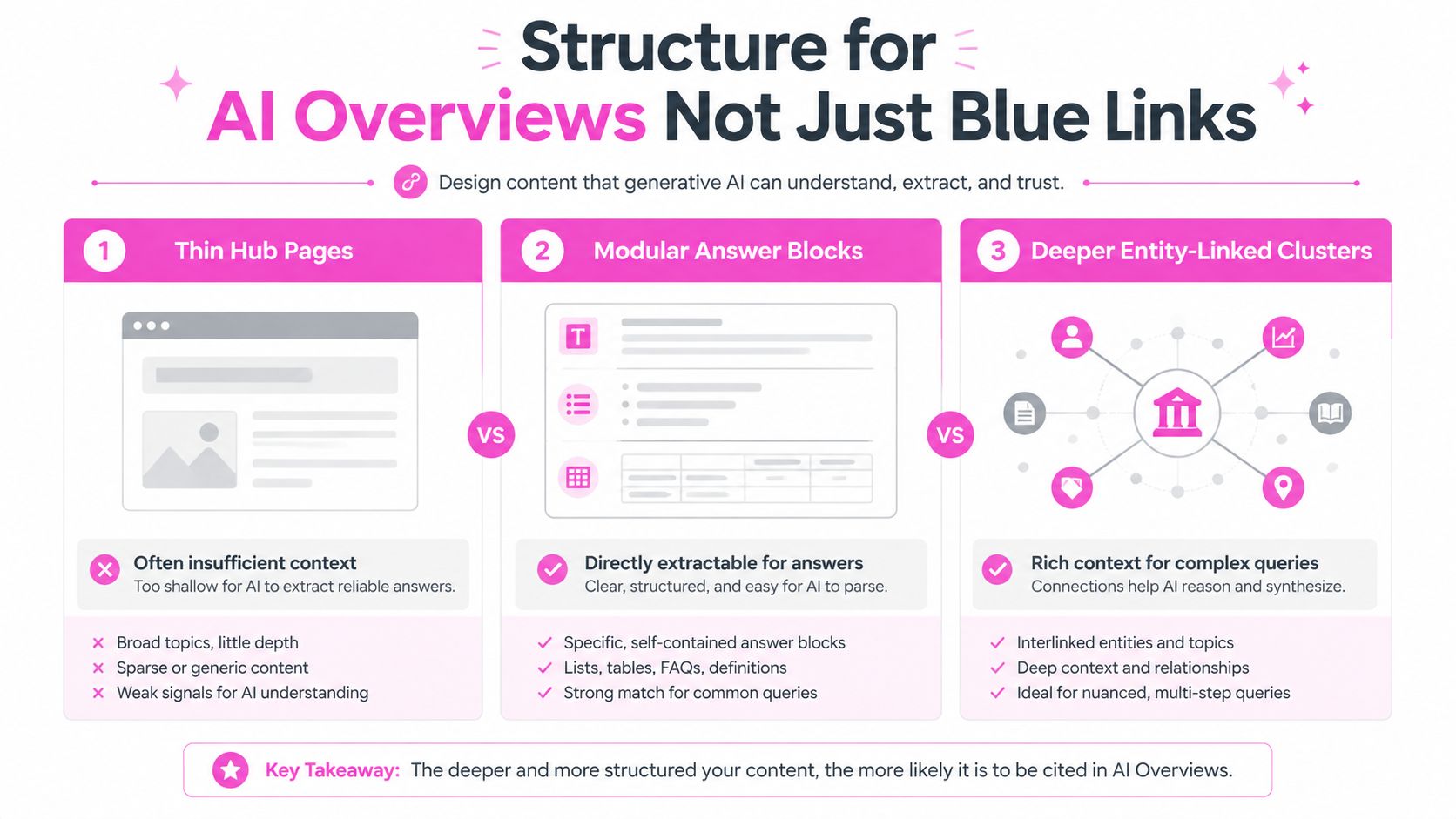
Compare the three patterns
Thin hub pages are easy to crawl but often lack enough context to support a nuanced answer. I use them only when the hub routes users to strong detail and answers the broad intent itself.
Modular answer blocks work well when a page needs to address distinct questions clearly. A definition, eligibility explanation, comparison, process, or limitation can stand alone while remaining connected to the broader page. This structure gives extraction systems clearer boundaries without turning the page into disconnected fragments.
Deeper entity-linked clusters suit complex subjects where one page can't establish all the relationships. A central entity page can link to attributes, use cases, alternatives, evidence, and supporting documentation. The depth adds value when every child page contributes distinct information.
My testing starts with the query type, not a preferred template. I compare which URLs appear for AI Overview prompts, inspect the cited page sections, and look for patterns in answer completeness, entity clarity, and supporting links. For structured data implementation, I keep this reference on structured data for SEO nearby, but I don't mistake markup for a substitute for useful page content.
A modular page can support both blue-link visibility and citation if it has a clear subject, precise answers, visible evidence, and links that establish the surrounding topic. A thin hub can be technically clean and still provide too little substance.
What I Learned Rebuilding a 20k Page Site
The migration that changed my process involved a 20k-page site with broken silos, orphaned facets, and client-rendered hubs. The site had plenty of content, but the architecture didn't communicate priority. Important cluster heads sat behind weak paths, while filter URLs competed with pages that were supposed to carry the commercial intent.
I began by classifying URLs by role rather than by the folder they happened to occupy. We separated money pages, cluster heads, supporting resources, and deep archives. Revenue-critical destinations moved closer to relevant hubs, while specialized archive content retained depth and gained stronger parent and sibling links.
The rebuild decisions
We replaced visual-only headings with semantic template structure and introduced consistent landmark regions. The team also applied the five-link minimum to important pages, then used crawl data to find orphaned URLs and redirect chains rather than relying on navigation reviews.
The most consequential technical change was moving money-page content, internal links, canonical signals, and structured data into server-delivered HTML. Client-side interactions remained, but the page no longer depended on them for its primary SEO meaning.
The expensive mistake was treating every indexed URL as equally valuable.
We also merged overlapping hubs instead of creating another layer of categories. That reduced duplication in the information architecture and gave the remaining hubs a clearer purpose. I would do that classification earlier today. We spent too much time debating folder names before agreeing on which pages deserved to exist.
The outcome and the lesson
Cluster heads recovered their rankings within two quarters, and crawling of deep archives stabilized. Those outcomes came from several coordinated changes, not from flattening the site or adding a single technical tag. The useful lesson was operational: architecture needs ownership, monitoring, and recurring validation after launch.
I now review crawl paths, sitemap coverage, rendering output, internal links, and page intent together. A site can have clean URLs and still waste crawl demand. It can have excellent content and still hide it behind a weak link graph. It can render beautifully and still deliver the wrong first response.
Web page architecture works when those systems agree about what matters.
SemDash can help you map keyword intent into page-level clusters, compare competitor URLs, inspect internal-link opportunities, and track which URLs receive AI Overview citations. Visit SemDash to connect your architecture decisions with live SERP, keyword, backlink, and citation data.