%20(1)-B86R08ZzwhPzS6UZbG3mSxRWPCwGwn.png)



Submitting a sitemap isn't the first fix for a missing page. If you're figuring out how to get Google to index your site, start by checking what Google can access, render, and keep. Another submission won't repair a blocked directory, remove a stray noindex directive, or restore product descriptions that never load.
I would treat indexing as a diagnosis problem, not a submission problem. Find the first failed check, correct that specific failure, and then ask Google to reconsider the page. That approach gives you a testable next action instead of another request confirmation.
Inhaltsverzeichnis
- Check Whether Google Can Index the Page First
- Sitemaps and robots.txt Do Different Jobs
- How to Get a New Page Indexed Step by Step
- Internal Links and Rendering Gaps That Hide Pages
- Fixing Pages That Stay Unindexed
- Crawl Budget on Large Sites Before Re-Requesting Indexing
- Confirm Indexing and Set a Monitoring Routine
Check Whether Google Can Index the Page First
Start with the exact public URL you want indexed, including its protocol, path, and trailing slash. Don't substitute the homepage or assume that every URL in a directory behaves the same way.
Google's technical requirements establish the baseline: Googlebot must not be blocked, the page must return HTTP 200, and the page must contain indexable content. Passing those requirements makes your page eligible, not guaranteed, for indexing. Google still has to discover, fetch, analyze, and decide whether to store your content.
Indexing eligibility checks before you request anything
Run these checks from top to bottom. Record the result rather than relying on how the page looks in your normal browser session.
| Check | How to verify | Pass condition |
|---|---|---|
| Googlebot access | robots.txt tester and URL Inspection | Googlebot is not blocked |
| HTTP status | URL Inspection or curl -I |
200 OK with no redirect chain |
| Anonymous access | Private browser window, logged out | Page loads without a login |
| Canonical | URL Inspection, Google-selected canonical | Matches the URL you want indexed |
| noindex | HTML source and HTTP response headers | No noindex directive present |
| Indexable content | Rendered HTML in URL Inspection | Title and main text appear in the rendered page |
Say you're testing the public product URL your team has chosen for launch. Access passes, the response is successful, the page opens logged out, and the canonical is correct, but the response headers contain X-Robots-Tag: noindex. The first failed row is noindex, so the immediate fix belongs in your application, hosting configuration, or delivery layer, not your copy.
Remove that directive and test again before moving on. Checking only view-source would miss a header-level instruction, which is why both checks belong in the workflow.
Diagnostic rule: A working browser page isn't evidence that Google can index it. Verify access, response, directives, and rendered content separately.
For redirects, inspect the destination rather than treating the starting URL as your indexing target. For canonicals, distinguish your declared preference from Google's selected URL; don't assume they're identical. Finish by opening the rendered HTML in URL Inspection and finding the actual title and main text, not just the page shell.
Write down the first failure and who owns the fix. That keeps a server-access problem from becoming an unnecessary content rewrite.
Sitemaps and robots.txt Do Different Jobs
Use a sitemap to identify URLs you want considered. Use robots.txt to control crawler requests. Use noindex when you want a publicly accessible page kept out of search.
Those aren't interchangeable controls. If you choose the wrong mechanism, you can make a URL discoverable without making its content accessible, or prevent Google from reading the instruction meant to exclude it.
What each control does for indexing
| Mechanism | What it controls | What it does not do | Use it when |
|---|---|---|---|
| XML sitemap | Discovery of URLs you want considered | Guarantee crawling or indexing, or raise rankings | New sites, large catalogs, frequent updates |
| robots.txt | Whether crawlers may request a URL | Remove a page from search results | Crawl control for filters, parameters or heavy paths |
| noindex (meta tag or header) | Whether a page is kept out of the index | Stop crawling; the page must stay crawlable | Removing a public page from search |
Keep sitemap files in UTF-8, and include canonical, indexable URLs rather than redirects or excluded pages. Under Google's sitemap specifications, a file can contain at most 50,000 URLs or 50 MB uncompressed, so a hypothetical store with 120,000 product URLs would need at least three sitemap files, provided each also meets the size limit.
Submit a sitemap index for that setup and inspect processing errors in Search Console. Successful processing tells you the file was understood, not that every product entered the index.
Don't block the instruction you need Google to read
Say you retire /old-campaign/ but leave the page publicly available for existing customers. Blocking that path in robots.txt isn't a reliable removal method: Google's getting-started guidance explains that a disallowed URL can still appear in results when other pages link to it, potentially using the URL and anchor text.
For that public page, use noindex and allow crawling so Google can read it. If the material needs privacy rather than search exclusion, require authentication instead.
Test broad Disallow rules against both content paths and asset paths. A rule intended to suppress filter combinations can also block scripts or styles needed to understand your main catalog.
Choose by outcome: Sitemap for discovery, robots.txt for crawl control, noindex for search exclusion.
I would keep those decisions separate in your deployment checklist. Combining them into a single “SEO visibility” switch makes troubleshooting unnecessarily difficult.
How to Get a New Page Indexed Step by Step
Use a repeatable launch sequence instead of manually submitting every URL you publish. Your prerequisites come first; an indexing request belongs after technical validation, not before it.
Use this process visual as a launch checklist, with access and discovery checks completed before you submit a priority URL.
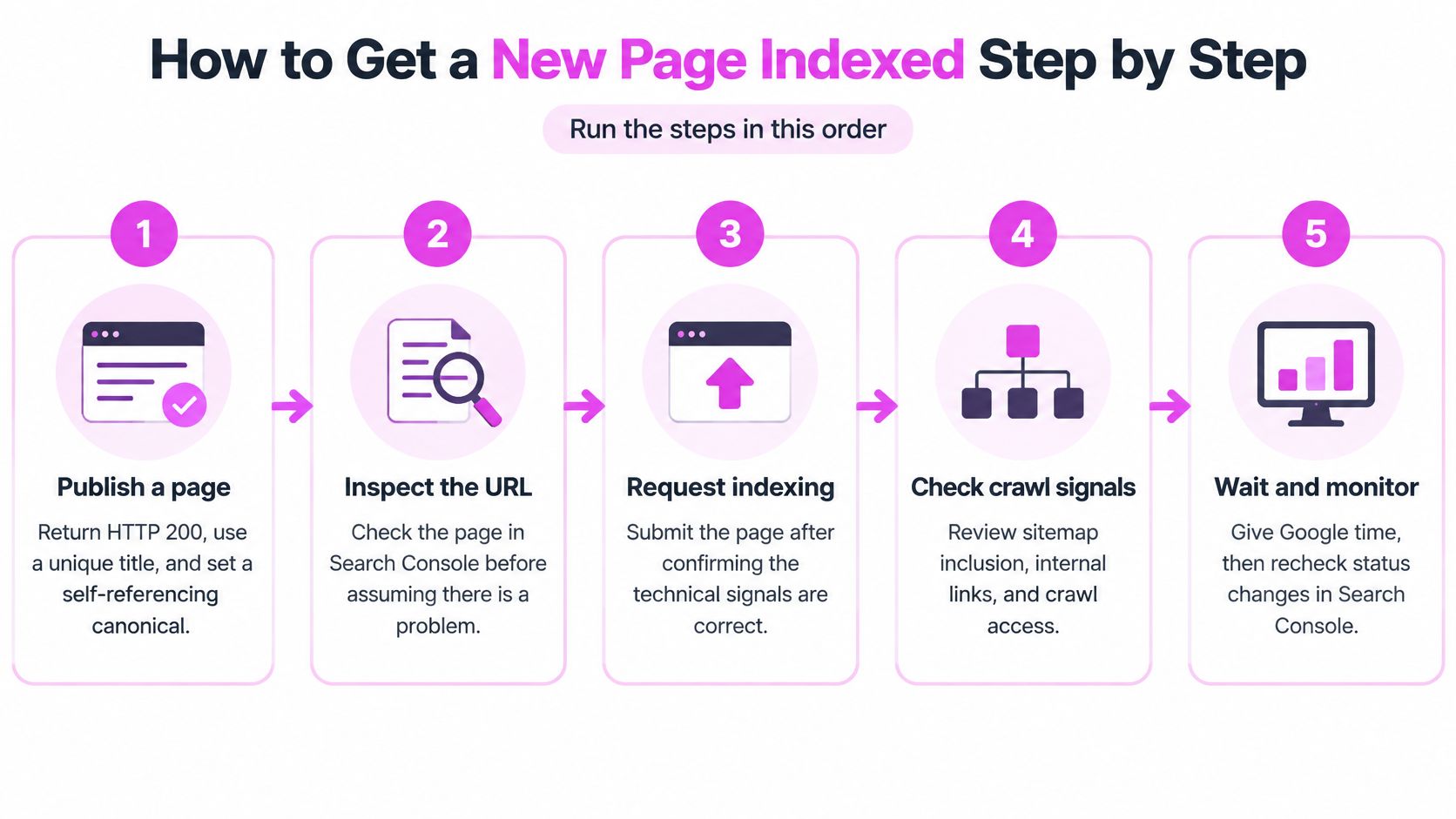
Run the publishing workflow
Publish a page. Establish eligibility before creating discovery signals: publish the final public URL with a successful response, a unique title, and a self-referencing canonical when this is the version you want indexed. Keep staging URLs out of the workflow and confirm that you can load the content without logging in.
Add a crawlable internal link. Give Google a route to the page before relying on manual requests by linking from an indexed category, hub, or relevant article. Use descriptive anchor text in a real link, and choose a location where a visitor would reasonably expect to find the new content.
Update and submit your sitemap. Add the canonical URL after publication so your sitemap reflects the live release rather than a planned destination. Submit the sitemap or sitemap index in Search Console, then check whether processing completed without errors.
Inspect the URL and request indexing. Validate the published result before spending a request: open URL Inspection, review the reported signals, and run the live test when you need to confirm a correction. Reserve Request indexing for priority pages such as your homepage, a relaunched category, or a commercially important corrected URL.
Wait and monitor. Allow time for processing before deciding that submission failed: Google's recrawl guidance says crawling can take a few days to a few weeks, gives no guaranteed indexing deadline, and states that repeated requests won't accelerate crawling. Review URL Inspection and the Page Indexing report for changed status, crawl activity, or a specific exclusion.
Use requests selectively
You need owner or full-user access to the verified property to use the indexing request workflow. Search Console's URL Inspection documentation also describes daily limits for inspections and indexing requests, so don't build a catalog launch around manually submitting every product.
For a large release, automate sitemap inclusion and internal linking through your publishing system. For a corrected priority page, record what you changed and when you requested reconsideration, so you can distinguish an old crawl result from a post-fix result.
Use the walkthrough below alongside your own Search Console checks.
Don't interpret the request confirmation as an indexed status. It confirms submission for consideration; your evidence comes from the later inspection result. If you still have an exclusion after Google revisits the page, investigate that exclusion instead of repeating the launch sequence unchanged.
Internal Links and Rendering Gaps That Hide Pages
A sitemap can't compensate for an empty rendered page. You can make a URL easy to discover while still failing to expose the content you want indexed.
An empty-looking HTML source doesn't automatically mean failure, either. Google's JavaScript SEO documentation describes crawling, rendering, and indexing: Googlebot fetches the URL and may render it using headless Chromium before using the rendered HTML for indexing.
Compare the fetched page with the rendered page
Fetch the raw HTML, then compare it with the rendered HTML available through URL Inspection. Search both versions for the product name, main description, canonical element, and links to related pages.
- Missing main text: Check whether your content request fails, requires a session, or runs only after an interaction.
- Missing links: Replace navigation based solely on click handlers with anchor elements containing usable
hrefvalues. - Missing assets: Check whether robots rules or server controls prevent access to required JavaScript and CSS.
- Different experiences: Test mobile and desktop behavior, especially consent screens, personalization, and international versions.
Say your storefront returns a header, footer, and loading animation, while product details arrive through a client-side request. Don't stop at confirming that the loading animation renders. Verify that the final product text appears without accepting cookies, selecting a location, or signing in.
Rendered content is the test. A successful JavaScript bundle download isn't proof that your main content appeared.
Choose reliable delivery for critical content
I would favor server-side rendering or static generation when essential copy and navigation repeatedly depend on fragile client-side execution. The trade-off is additional implementation and caching work, but you reduce your dependence on successful browser-side requests for the page's core meaning.
You don't need to eliminate JavaScript. Keep interactive features where they help users, while delivering dependable titles, descriptions, canonicals, and links.
Also check for orphan pages, meaning URLs with no crawlable internal route. Review your web page architecture so important categories and supporting content connect through useful navigation, not just sitemap entries.
Fixing Pages That Stay Unindexed
Discovered, currently not indexed und Crawled, currently not indexed require different starting points. With the former, Google knows the URL but hasn't crawled it; with the latter, Google has fetched it without currently including it in the index.
Treat weak linking and low-value content as diagnostic hypotheses, not conclusions proven by a status label. In a 2024 study published in 2025, IndexCheckr's analysis of 16 million pages reported 2,138,912 indexed pages and 2,464,277 not-indexed pages. Those counts don't diagnose your URL, so use its individual inspection result to choose the repair.
Use the report alongside the actual page response and rendered output.

Page Indexing statuses, causes and fixes
| Page Indexing status | Likely cause | Fix |
|---|---|---|
| Discovered, currently not indexed | Weak internal links or low perceived importance | Link from indexed hub pages and strengthen the content |
| Crawled, currently not indexed | Thin, duplicate or low-value content | Add unique detail, merge thin pages or consolidate duplicates |
| Blocked by robots.txt | A Disallow rule matches the URL | Remove the rule if the page should be indexed |
| Excluded by noindex | Meta tag or X-Robots-Tag header | Remove the directive and recheck the page |
| Alternate page with proper canonical | Canonical points to another URL | Make the canonical self-referencing if this page should rank |
| Soft 404 | Thin page returns HTTP 200 | Return a real 404 or add substantial content |
| Server error or redirect | 5xx response or redirect chain | Fix the server response and point links at the final URL |
Decide whether the URL deserves a separate place in search
For thin content, don't pad the page. Add information that changes its usefulness: product compatibility, original specifications, service boundaries, implementation examples, or answers specific to the subject. If you can't identify a distinct purpose, merge the content into a stronger destination.
For duplicates, decide which URL should represent the content before changing canonical tags. An alternate page with a proper canonical may already be behaving correctly; don't make every variation self-referencing just to reduce your exclusion count.
With an unexpected noindex, inspect both the template and delivery configuration. Use the meta robots tag workflow to separate an intentional exclusion from a directive accidentally inherited from staging or a shared template.
A soft 404 needs an honest decision: restore meaningful content or return the appropriate not-found response. Don't leave an empty category or missing-product message returning success just because you want the URL indexed.
Before requesting reconsideration, verify the repair in the live test. Fix the cause, not the report count. Some excluded URLs should remain excluded.
Crawl Budget on Large Sites Before Re-Requesting Indexing
If you manage a large, changing catalog, investigate where Googlebot spends its requests before adding more submission activity. Crawl capacity describes how much Googlebot can fetch without harming your server; crawl demand reflects how much Google wants to fetch based on factors such as freshness and perceived importance, according to Google's crawl-budget guidance.
Start with access logs. Filter verified Googlebot traffic, group requests by URL pattern, and compare response codes, latency, and crawl frequency across products, categories, filters, and parameters.
Remove crawl waste in a deliberate order
- Stop generating endless combinations: Remove session IDs and unnecessary filter permutations from crawlable internal links.
- Consolidate duplicates: Choose preferred pagination and filter destinations, using canonicalization where the content overlaps.
- Repair response problems: Resolve soft 404s and redirect chains, then update links to final destinations.
- Preserve priority routes: Keep important categories and new products reachable through crawlable anchors.
Don't assume that a large catalog automatically needs specialized crawl-budget engineering. For many sites, current sitemaps and regular Page Indexing reviews are sufficient.
Also avoid the Indexing API as a general shortcut. Its supported scope is pages with JobPosting structured data or BroadcastEvent embedded in a VideoObject, and notifications don't guarantee inclusion.
Measure the important canonical URLs that progress through discovery, crawling, and indexing. A higher submission count isn't a useful outcome if Googlebot keeps fetching disposable parameter combinations.
Confirm Indexing and Set a Monitoring Routine
Confirm the result in URL Inspection, using the indexed status, reported crawl date, and Google-selected canonical. A recent crawl helps you establish whether Google evaluated your corrected version; it isn't a substitute for the indexed status.
I would keep a simple change log containing the URL, intended canonical, failed check, repair, and subsequent inspection result. That gives you a baseline when a template deployment changes behavior.
Keep checks tied to publishing changes
- Weekly review: Check the Page Indexing report for new exclusions affecting priority content and inspect representative URLs from each affected template.
- Monthly sampling: Recheck important commercial and editorial pages, comparing Google's selected canonical with your intended destination.
- After deployments: Test access, directives, responses, and rendered content on the templates you changed.
- Traffic destination review: Compare the URL receiving search traffic with the page you intended to promote.
We show the specific page Google sends traffic to for every keyword in SemDash. Use that mapping to spot an older duplicate receiving traffic instead of your relaunched destination, then investigate the competing URLs.
Choose a priority page this week, record its current inspection result, complete the publishing workflow, and log when its indexed status is confirmed. Keep the diagnosis and the outcome together.
Visit SemDash to see which page Google sends traffic to for each keyword and compare it with your intended destination. Start with your priority page, then use that URL-level view to identify competing pages that need a closer canonical or content review.