%20(1)-B86R08ZzwhPzS6UZbG3mSxRWPCwGwn.png)



You've sent the deck, joined the call on time, and you're feeling prepared. Then you share your screen, click to the traffic graph, and watch everyone reach for their phones. I've been on both sides of that moment, and I've learned the data rarely loses the room. The format does. A good SEO reports format starts with a decision, supports it with evidence, and then gets out of the way.
Inhaltsverzeichnis
- The Report No One Actually Reads
- The Core Sections Every SEO Report Needs
- KPIs That Survive a Hard Question
- Reporting AI Search Visibility Honestly
- Tailoring One Dataset for Three Audiences
- Choosing How You Build and Ship the Report
- Your Pre-Send Checklist and Common Mistakes
The Report No One Actually Reads
I used to open monthly reviews with a full dashboard. Traffic went up, traffic went down, a few ranking tables followed, and I narrated every chart as if narration created value. Around slide four, the questions stopped because my client couldn't tell what I wanted from them. Were we approving new content, fixing a technical blocker, or just admiring a curve?
The failure wasn't that my numbers were wrong. My report had no comparison period, no useful segment, and no recommendation tied to an owner. A domain-wide traffic line can hide a winning product page, a collapsing mobile result, and a completely flat international market inside one reassuring average. My client didn't need more evidence. My client needed to know what changed, why it mattered, and what I proposed doing next.
I stopped sending CMOs the same export I used for diagnosis. I now send a short decision memo first, with the detailed tables attached for anyone who wants to audit my reasoning. That change shortened my calls and improved them, because we spend our time debating priorities instead of deciphering charts. When I want inspiration for how commercial teams structure that top layer, I look at funnel metrics and dashboard templates and steal the discipline, not the sales metrics.
My Three Question Test Before I Hit Send
Before any report leaves my inbox, I ask whether a busy reader can answer three questions in under two minutes. First, what is the one result I need you to notice? Second, what's the evidence that this result isn't an artifact of dates, segments, or attribution settings? Third, what decision, owner, and deadline follow from it?
Praktische Regel: If I can't point to the decision on page one, I haven't written a report yet. I've exported data.
That test kills a lot of attractive but useless slides. I cut screenshots I can't explain, ranking tables with no page or query context, and commentary that reads the chart aloud. What survives is shorter, harder to write, and far more useful. My clients don't pay me to prove I opened Search Console. They pay me to make the next move clearer than it was last month.
The Core Sections Every SEO Report Needs
I build every report from the same skeleton, then I tailor the depth. My first page is an executive summary with one headline result, the reporting and comparison periods, and the decision I need this week. I don't put five wins and five losses there. If everything's a headline, nothing is.
Below that summary, I separate visibility from engagement. My core Search Console table shows clicks, impressions, CTR, and average position, which Google defines in its Search Console Performance report documentation as visits from search, appearances in results, clicks divided by impressions, and the average position of the topmost result. I break those four metrics by query, page, country, and device because a blended average tells me almost nothing about what to fix. Impressions show reach, position shows ranking exposure, clicks show visits acquired, and CTR shows how well the listing turned exposure into a visit.
Here's the hierarchy I give clients when they ask why my report doesn't start with a keyword table.
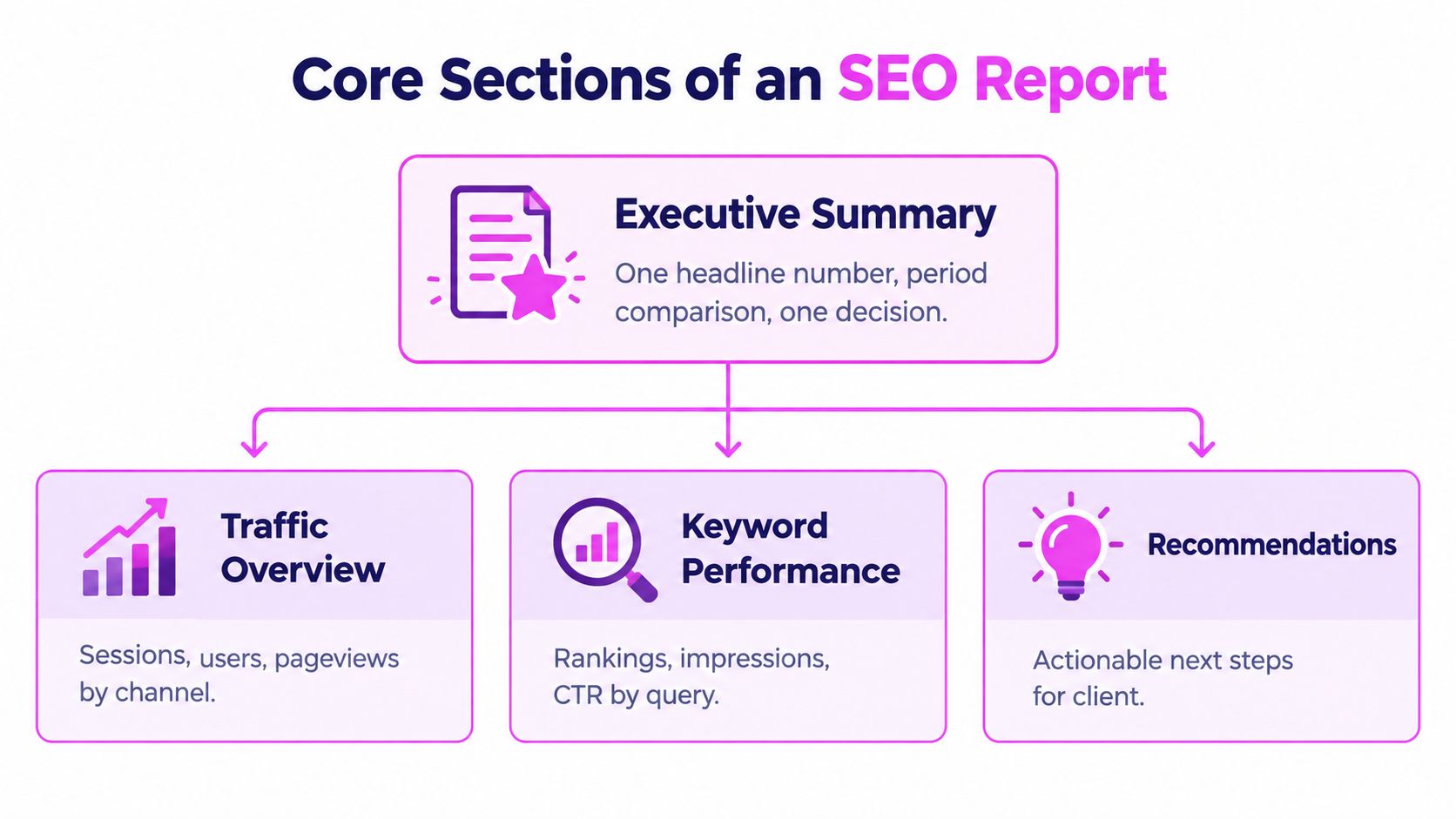
My next block covers acquisition and landing pages. I connect Search Console clicks to organic sessions, then I look at engagement and conversions by landing page rather than by the whole domain. A page that gains clicks but sends visitors straight back needs different work from a page that's losing impressions because search demand or intent moved. My technical and content block follows, covering indexation changes, Core Web Vitals movement, internal links added, and content shipped during the period. I keep this block factual and dated, so we can connect later performance changes to work we released.
The Action Log Is Where Trust Is Built
I finish with an action log, and I carry unfinished items forward until they're closed or explicitly dropped. Each item gets an owner, a deadline, and the expected effect we're watching for. This sounds administrative until a client asks why a recommendation from two months ago still hasn't shipped. The log answers without turning the call into an archaeology project.
For layout, I borrow principles from GTM dashboard KPIs and layouts because revenue teams are usually better than SEOs at putting the commercial number first and the diagnostic detail second. I don't copy their metrics. I copy the order. Decision, outcome, diagnostic evidence, action. That order works whether I'm reporting to a founder, an in-house lead, or an agency client.
KPIs That Survive a Hard Question
I don't lead with average position anymore. It was already a blunt average across queries, devices, and countries, and it gets harder to interpret when featured snippets, AI answers, and other search features reshape the page. A client can ask one hard question, which queries and pages drove that average, and the headline collapses if I don't have the segmentation ready.
The comparison below is close to the conversation I have when a stakeholder asks me to restore the old rankings slide.
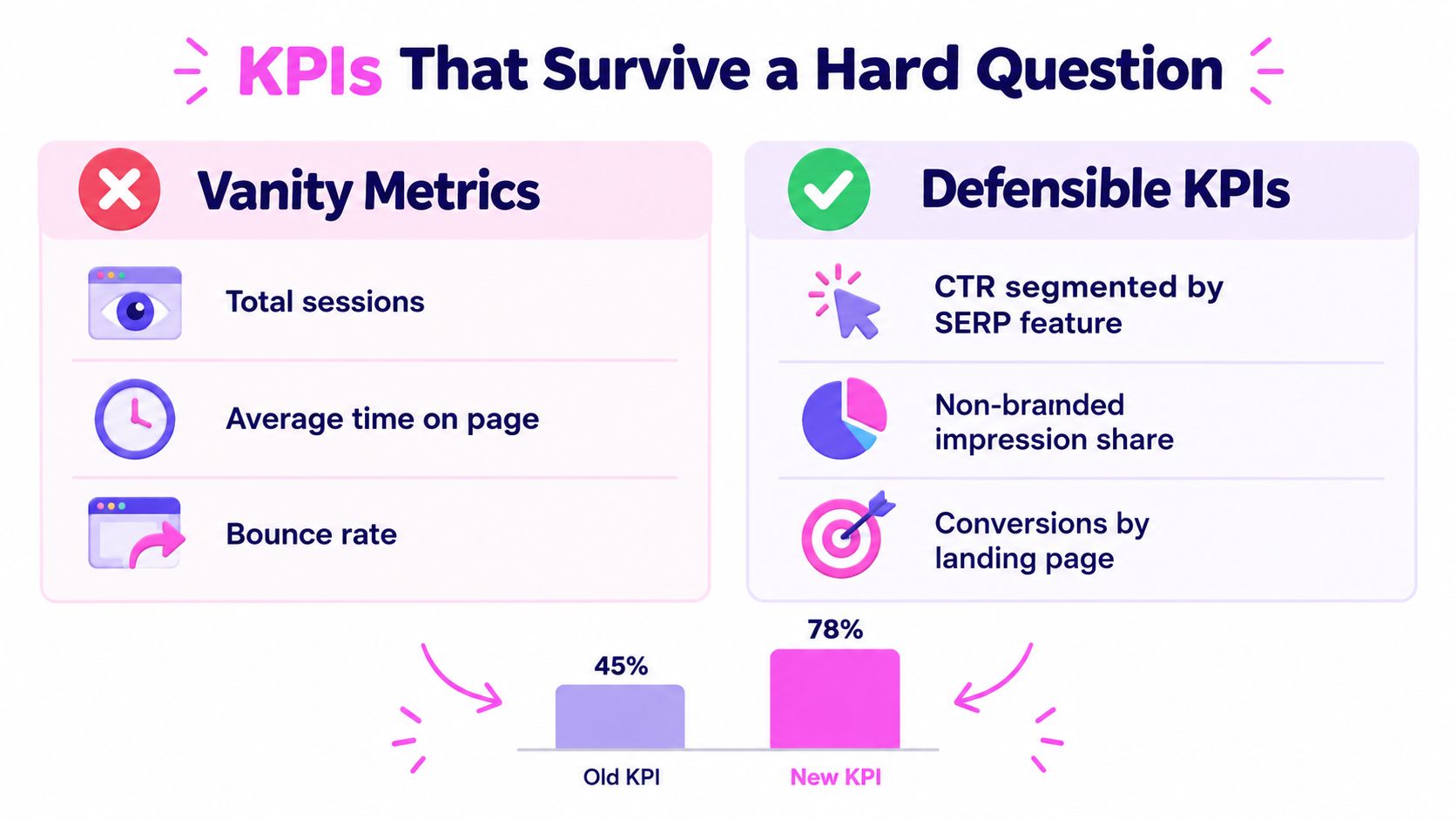
I replace the rankings tab with a table that can survive cross-examination. I show query or cluster, landing page, impressions, clicks, CTR, and position for the current period beside an equivalent comparison period. Then I split branded from non-branded demand where the query data allows it, because branded growth can reflect PR, ads, or seasonality rather than my SEO work. I care a lot about non-branded impressions as a leading indicator, but I don't call them business results.
What I Actually Defend in the Room
- CTR by query, page, device, and search appearance: This helps me see whether a listing is earning the click when we're visible.
- Engaged sessions by landing page: This separates useful organic visits from clicks that immediately disappoint the visitor.
- Assisted and first-touch outcomes: These show search influence without pretending the final click tells the whole story.
- Pages gaining or losing impressions: This gives my content team a direct rewrite, expansion, or consolidation queue.
Attribution is where I slow down. In a 2025 survey of 170 marketers, 32.4% used multi-touch attribution, 20.6% used custom models, 18.2% used first-touch, and only 8.2% used last-touch, according to the 2025 organic growth measurement survey. That spread is exactly why I never present one organic revenue figure as fact. I document the model and window, show parallel views when the stakes justify it, and separate leading indicators from lagging outcomes such as sales or renewals.
I also track whether people opened and read the report when we send it as a document, and I tell clients to compare document tracking tools if stakeholder engagement is a recurring mystery. That doesn't make a weak KPI stronger, but it tells me whether my problem is distribution or substance. Usually, it's substance.
Reporting AI Search Visibility Honestly
I keep AI search in its own section because mixing it into classic clicks makes both stories murkier. Google's AI features documentation for site owners says links in AI Overviews and AI Mode are reported inside the standard Web search type in Search Console. There's no clean dedicated filter that lets me say this CTR drop came from AI and that one came from blue links.
This is the point in my client calls where I show my tracked citations separately instead of pointing at a blended chart.
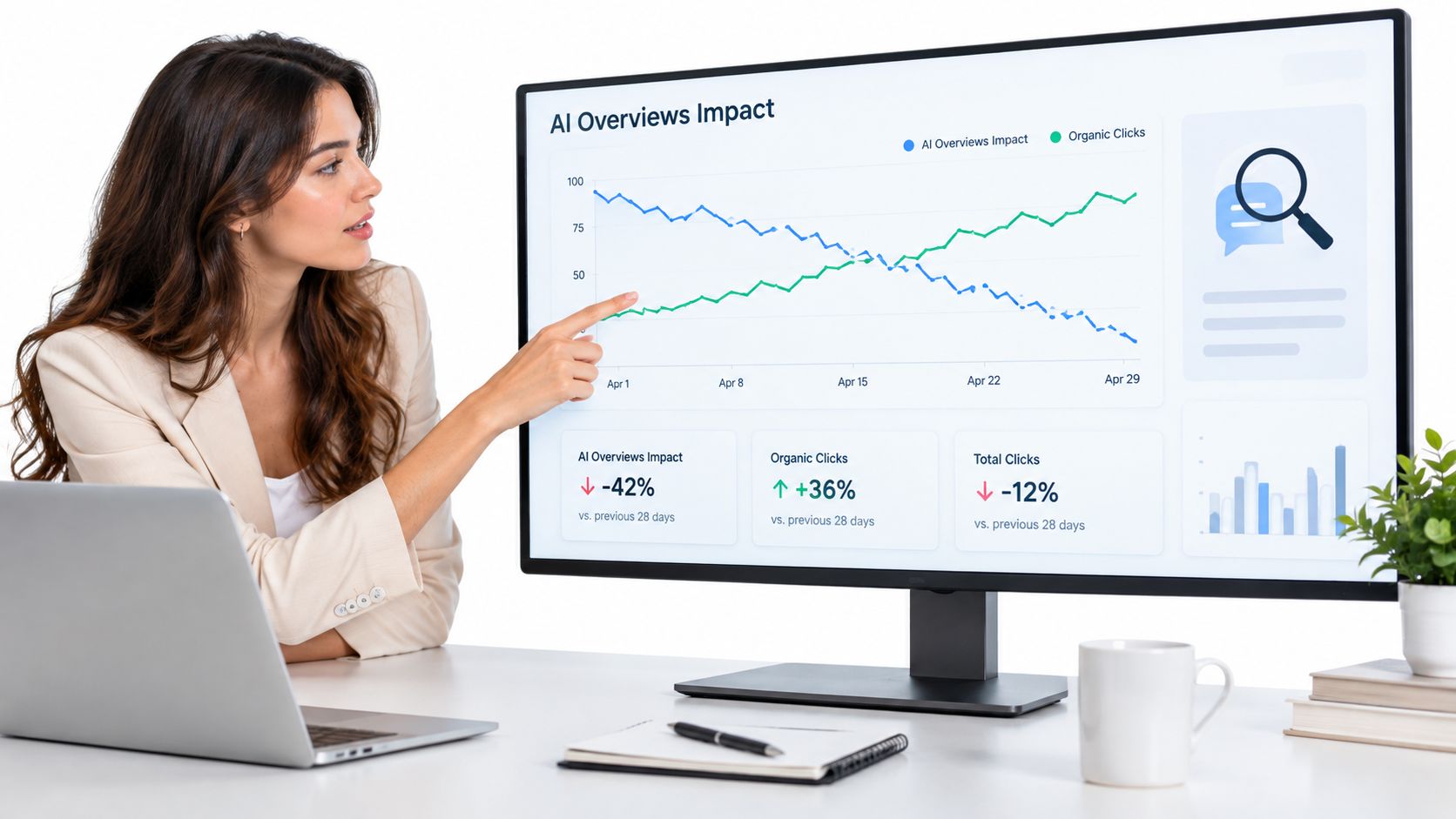
My format has three layers. The first is classic visibility, using the Search Console metrics and segments I already trust. The second is tracked AI citations, where I record the query, its intent, the cited URL, the date observed, and whether competitors appeared with us. The third is assisted outcomes, including branded search movement, direct visits to cited pages, self-reported discovery from forms or sales calls, and conversions where we have a defensible path. I label that third layer as influence, not attribution.
Why I Refuse to Report One AI Visibility Score
A single score looks clean in a deck and falls apart under questioning. I don't know whether every citation had equal prominence, whether the same answer appeared for every user, or whether visibility caused a later visit. My job is to show the evidence and the confidence limits together. Our deeper guidance on measuring AI search visibility follows that same separation, because a citation isn't a click and shouldn't be priced like one.
The measurement gap isn't theoretical. In that same survey data referenced in my research, stakeholder reporting for AI visibility lagged far behind marketer confidence, so I make the limits explicit on the page. I write observed, inferred, or unattributed beside each claim. Clients trust that language more than false precision, especially when we're deciding whether to invest in content built for citation rather than click capture.
When I walk specialists through the workflow, I use this walkthrough to show how messy the underlying evidence can look before we clean it into layers.
Tailoring One Dataset for Three Audiences
I learned this the uncomfortable way with a CFO who kept skipping to the last page. I thought he was impatient. He later told me he was looking for one line, qualified pipeline influenced, and he'd learned my ranking tables wouldn't answer his budget question. He was right. I rebuilt his version around outcomes, risk, and the decision I needed, and I moved my beloved query tables to the appendix.
I now build one source workspace and cut three versions from it. The data doesn't change. The emphasis, vocabulary, and level of proof do. That keeps us honest, because the CFO's headline can be traced back to the same page and query tables my specialists use.
This is the split I draw on a whiteboard when a team insists one PDF can serve everyone.
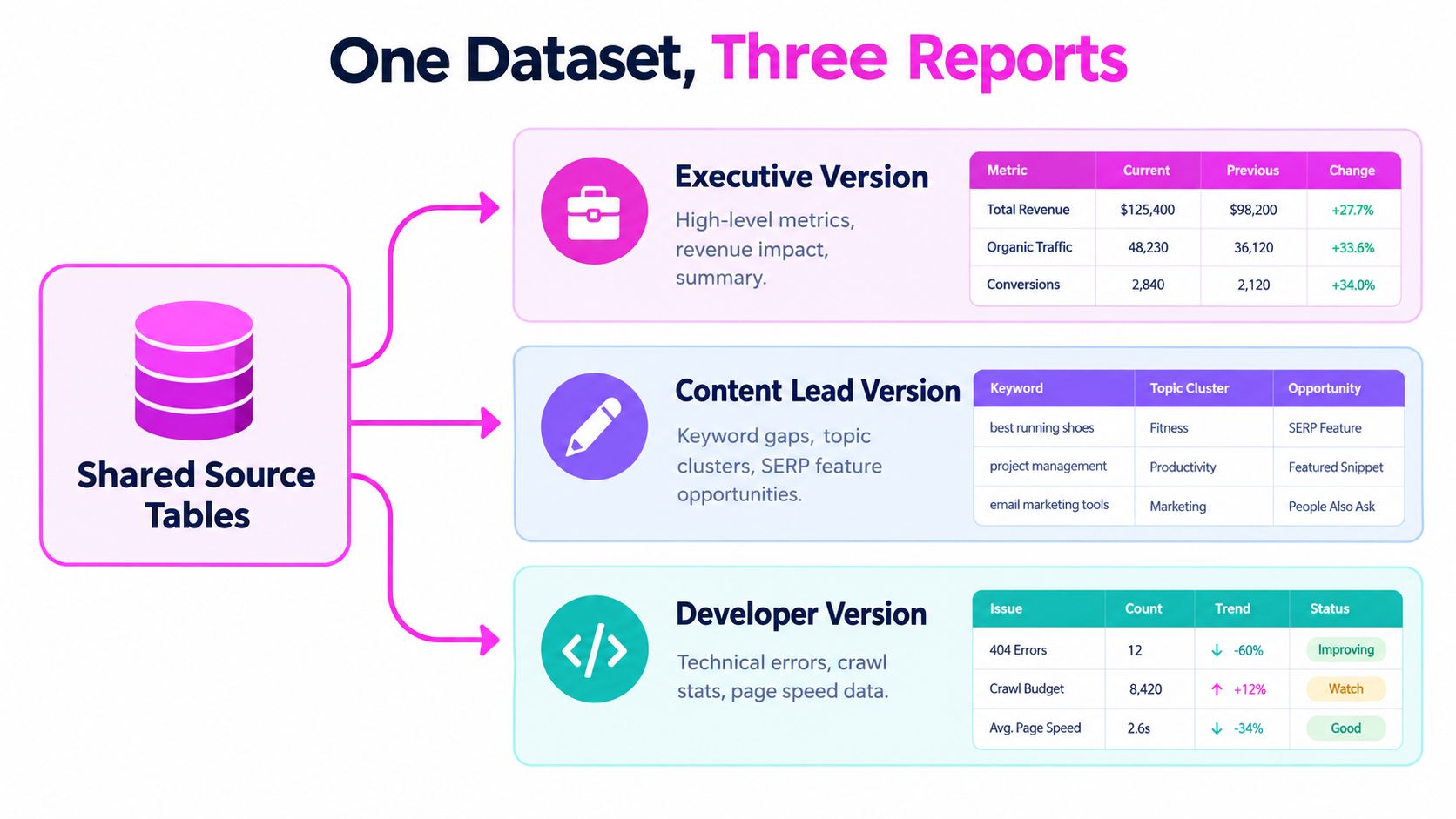
My executive version is one page when I can manage it. I include the headline outcome, comparison, material risk, and recommendation, plus the cost or dependency attached to that recommendation. I don't explain crawl budget to a CFO unless a crawl problem threatens revenue pages. I translate it into pages at risk, work required, and what happens if we wait.
My specialist version keeps the drill-downs. Queries, pages, countries, devices, search appearance, filters, and aggregation level stay visible, and I attach exports rather than screenshots. I want another SEO to reproduce my numbers and challenge my interpretation. If they can't, my format is protecting me instead of informing them.
The Content Owner Needs a Work Queue
My content owner version is page-centric. I list URLs gaining and losing impressions, queries where intent looks mismatched, briefs to rewrite, pages to consolidate, and internal links to add. I also include competitor pages when they explain why our page stopped satisfying the query. A writer shouldn't have to reverse-engineer an assignment from a domain traffic chart.
One dataset, three decisions. That's how I judge whether my segmentation is working.
Choosing How You Build and Ship the Report
I use three build methods depending on client size, and each one breaks in a predictable place. Manual exports are flexible, but I become the integration. Looker Studio looks polished, but convenience can hide retention and blending problems. Scheduled API exports are robust, but they need an owner and a data contract, not just a keen SEO with a script.
Report Build Methods Compared
| Methode | Setup effort | Recurring cost | Common failure | Best fit |
|---|---|---|---|---|
| Manual exports | Niedrig | My time every cycle | Missed or inconsistent pull | One site, early reporting |
| Looker Studio dashboard | Mittel | Connector and maintenance time | Historical data rolls out of view | Stakeholders who self-serve |
| API export to warehouse or sheet | Hoch | Engineering and storage oversight | Nobody owns a broken schedule | Multi-site or long trend analysis |
The retention issue decides more builds than people admit. Google introduced a 16-month Search Console window to support longer-term and year-over-year analysis, as described in Google's announcement of the new Search Console. If I wait until month-end and haven't stored older daily snapshots, I can't recreate them later. I schedule recurring exports for any client where year-over-year page and query analysis matters.
I also evaluate purpose-built tools when a client needs competitor pages, keyword gaps, SERP movement, and AI Overview citations beside first-party performance. I use SemDash in that context for domain and page-level competitor research that feeds the diagnostic appendix, not as a substitute for Search Console or Analytics. Our breakdown of choosing an SEO reporting tool is useful if you're weighing that layer against a pure dashboard build.
My deciding question is simple. Who notices when the data stops refreshing at 6 p.m. before tomorrow's call? If nobody can answer, I choose the boring method we can maintain over the elegant pipeline we'll abandon.
Your Pre-Send Checklist and Common Mistakes
I treat the newest Search Console days as provisional. Google says performance data is typically available after 2 to 3 days, according to its guide to accessing Search Console data. If I include an incomplete tail, I label it clearly or exclude it from month-to-date conclusions. That one habit has prevented several false traffic-drop panics.
I also check my Analytics source definitions before I blame SEO. Google Analytics can classify traffic from an unrecognized search engine as referral rather than organic search, and its conversion models include data-driven and last-click variants, as set out in Google's traffic source dimensions documentation. I document the model and lookback window in the report footer. It's unglamorous, and it saves arguments.
My Final Seven Checks
- Comparison period set: Equivalent dates, not a convenient slice.
- Provisional days labeled: No conclusions from the incomplete tail.
- Attribution documented: Model, window, and exclusions are visible.
- AI layer separated: Citations aren't blended into classic clicks.
- Filters preserved: Device, country, query, and page segments match the claim.
- Action log updated: Closed items disappear only after we've reviewed them.
- Drill-downs attached: Specialists can reproduce every headline.
The mistakes I still see are mostly format mistakes. We average position across devices, promote rankings to headline status, send the CFO the specialist PDF, and treat attributed revenue as a physical measurement. I send diagnostics weekly when we're shipping fixes, decision reports monthly, and market and pipeline reviews quarterly. If a metric doesn't change a priority at one of those cadences, I cut it.
Rebuild your next report around the decision, then use SemDash to fill the diagnostic layer with keyword gaps, competitor top pages, backlink gaps, SERP history, and AI Overviews citations by URL. You'll spend less time defending blended charts and more time showing clients exactly which page, query, or competitor move deserves action next.